Acropolis
Your calendar, tasks, and reading on every new tab. Free, private, and yours to arrange.
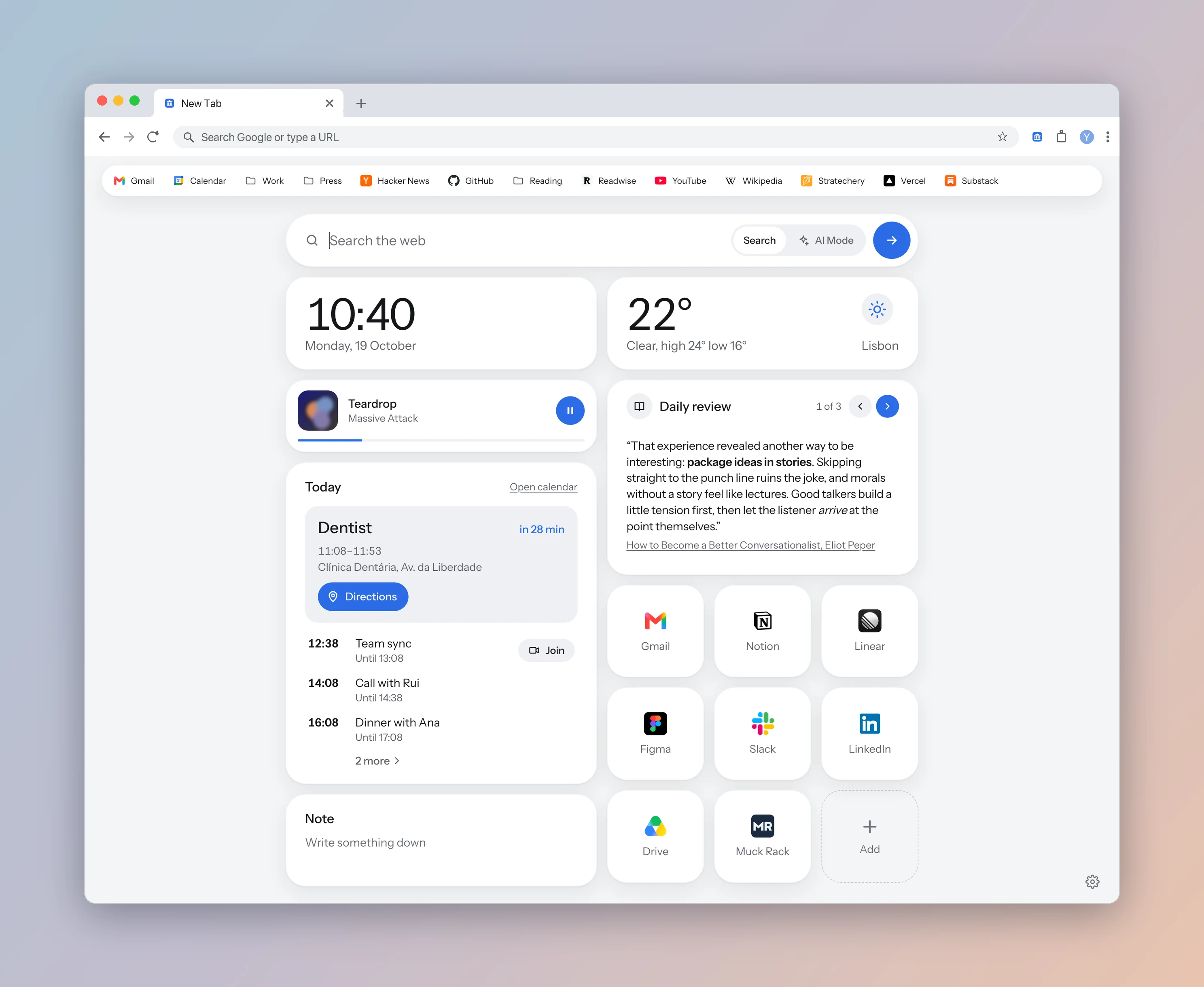
Acropolis gives Chrome an elegant new tab you can make your own. Sharp shortcut icons, your personal Google Calendar, Todoist tasks, and saved reading sit in cards you can show, hide, and arrange. No Google Doodles or sponsored shortcuts.
It’s a free new tab extension for Chrome and other supported Chromium browsers. No Acropolis account, ads, or subscription.
Your day and your reading, together
- Google Calendar: connect your personal or work account. See your next event with a countdown and a Join button, followed by the day’s schedule. Show tomorrow’s events when you want to plan ahead.
- Todoist: tasks due today and overdue. Complete a task right from the card.
- Readwise: revisit your Daily Review highlights, one at a time.
- Readwise Reader, Instapaper, Matter, and Shiori: see recent saves from the reading services you already use. You can also show your browser’s own Reading List where available.
- Now playing: see and pause or resume music and video playing in a browser tab.
- Notes and bookmarks: jot down a thought in a Markdown scratchpad, arrange shortcut tiles with high-resolution icons, and show your native bookmarks bar with its folders.
- Clock and weather: check the forecast and add a second time zone.
Make your new tab look and work your way
Show or hide cards, move them between two columns, and change their order. Keep a few essentials or build a fuller dashboard. Choose light or dark mode, fourteen accent colors, and your own wallpaper. Adjust time and date formats to suit you.
Search with your browser’s default search engine, or switch to Google AI Mode, ChatGPT, Claude, Gemini, or Grok. Press / to focus the search field. Queries go to the service you choose when you submit them.
Small and quick to open
Acropolis is about a 100 KB download, with its interface and fonts bundled locally. It displays cached calendar events and reading lists before refreshing them, so each new tab doesn’t start with an empty dashboard waiting on those services.
The extension stays small without putting its integrations or appearance settings behind a paid tier.
Private, with connections you control
Acropolis has no backend or analytics. Your notes, connected-service tokens, and cached data stay in local extension storage. Settings and shortcut tiles can sync through your browser account.
Connected services receive the requests needed for their cards. Weather and website icons also use external providers. You choose which integrations to connect and can disconnect them in settings. See the privacy policy for the details.
Is Acropolis completely free?
All Acropolis features are free. Optional integrations need your own accounts with those services, and their pricing still applies. For example, Matter’s API requires Matter Pro. You can use bookmarks, notes, themes, and the basic dashboard without connecting a reading or task service.
Which browsers does it support?
Acropolis works in Chrome, Brave, Edge, and other Chromium browsers that allow extensions to replace the new tab page. Google Calendar works across supported browsers. Opera doesn’t allow this type of new tab replacement. Browser-specific features, such as the native Reading List, depend on your browser.
A better alternative to Chrome’s new tab
Chrome gives you blurry shortcut icons, unwanted Doodles, and a Calendar card restricted to Workspace accounts. You can’t build your own dashboard from the services you use. Acropolis fixes those frustrations and gives you a page that looks better.
Read the new tab comparison, starting with Chrome’s default page, then Momentum, Bonjourr, Tabliss, Infinity New Tab, and start.me.
Install Acropolis for free. For Safari-style reading when you open an article, try Marble Reader.